


Views: 0 Author: Site Editor Publish Time: 2026-11-18 Origin: Site


Plate making and screen printing have evolved significantly over the past decade. Traditional darkroom methods are messy. Chemical baths take too long. Because of this, print shops are rapidly replacing them with faster, highly efficient digital inkjet solutions. However, transitioning to a digital workflow does not automatically eliminate production headaches on the shop floor. Print technicians frequently struggle with poor UV blocking, ink smudging, or substrate shrinkage during the exposure process. Any of these issues can completely ruin a production run.
The ultimate fix for these modern plate making woes is utilizing the right transparent substrate. Selecting a premium media guarantees razor-sharp edges, deep opaque blacks, and flawless exposures every single time. In this comprehensive guide, we will explore exactly how to select the best material for your specific workflow. We will compare material stability, ink compatibility, and crucial performance metrics.
High Density is Crucial: Premium media provides exceptional UV blocking capabilities. This ensures crisp, accurate, and highly defined stencils during the exposure process.
Premium Base Plastics Matter: Utilizing a high-quality 100 micron base prevents undesirable shrinking and stretching under heat. This stability is essential for maintaining strict registration accuracy in multi-color jobs.
Superior Coating Technology: Specialized micro-porous coatings ensure that mild solvent inks dry rapidly without bleeding or lateral spreading.
Eco-Friendly and Safe: Compared to harsh traditional solvent materials, modern technology offers a more sustainable, low-odor alternative. It is perfectly suited for modern indoor workspaces.
Cost-Effective Efficiency: Standardizing your process with the right material reduces misprints. It minimizes wasted emulsion screens and ultimately saves significant operational costs.
At its core, an eco solvent film is a highly specialized, transparent polyester substrate. Engineers design it specifically to absorb and retain mild solvent inks. Standard plastic sheets naturally repel liquid. In contrast, this professional-grade material features a proprietary micro-porous receiver layer. This topcoat is chemically formulated to interact with the specific carrier fluids found in modern inks. It allows the pigment to penetrate the surface and lock firmly into place while the fluid evaporates.
The mechanics behind this technology rely on a delicate interaction between the base material and the top coating. The base must remain dimensionally stable. Meanwhile, the coating must be porous enough to accept heavy ink loads for high-opacity blacks. It also needs to be robust enough to prevent the ink from spreading laterally and blurring fine halftone dots.
Recent market analyses highlight a massive migration toward sustainable printing practices within the flexographic and screen printing sectors. Environmental regulations are tightening globally. Consequently, commercial print shops are actively moving away from aggressive hard solvents. The industry is demanding greener solutions that do not compromise on industrial durability.
Furthermore, the rise of high-intensity LED UV exposure units has changed hardware requirements. Older, thinner plastics warp under the intense energy of modern LED lamps. Today, shop managers prefer thicker, 100-micron to 125-micron films. These thicker substrates handle the thermal stress of rapid exposure cycles flawlessly. This shift ensures environmental compliance while protecting workforce health, completely eliminating the need for expensive, industrial-grade ventilation systems.
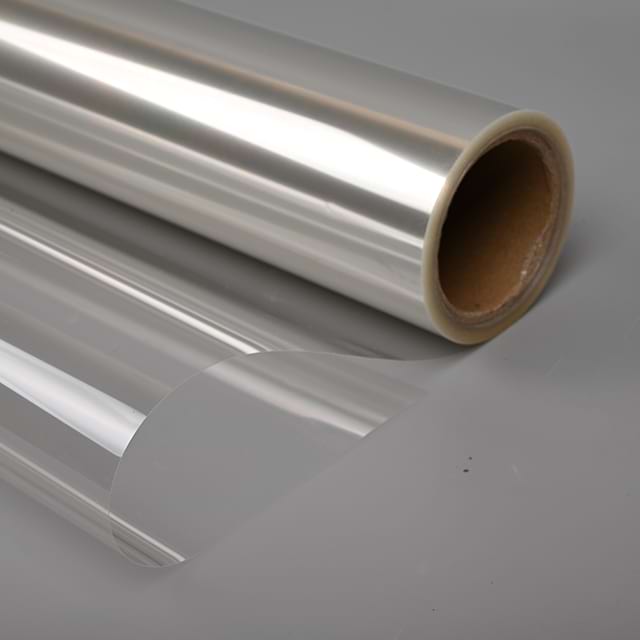
In screen printing and flexographic plate making, creating a flawless screen positive is the most critical foundational step. This transparent template features an opaque black design used to block ultraviolet light during the screen burning process. If the template has weak areas, pinholes, or soft edges, UV light will leak through. This stray light cures the photo-emulsion in areas that should remain open. By utilizing dedicated media, technicians achieve the dense, opaque blacks necessary to block UV light entirely. This ensures the unexposed emulsion washes out perfectly.
Traditional plate making often relied on hard solvent materials that release high levels of volatile organic compounds into the air. These chemicals pose long-term health risks to press operators. Modern inks utilize refined, milder carriers extracted from ether. They produce significantly lower emissions and emit almost zero odor. This makes the modern workflow a much safer choice for enclosed print shops.
The operational environment of a busy print shop involves constant handling, aligning, and storing of materials. Prints generated with this technology are naturally water-resistant and highly resistant to physical abrasion. Once the pigment cures within the micro-porous coating, it becomes permanently bonded. This industrial durability means the template withstands repeated handling, damp darkroom conditions, and the harsh mechanical pressure of vacuum exposure units.
The structural foundation of any high-grade transparent media is the base plastic. In professional plate making, this base is almost exclusively made from clear PET. This thermoplastic polymer resin is renowned in the engineering world for its exceptional mechanical strength, optical clarity, and thermal stability.
Dimensional stability is the most critical physical property provided by this base. During the workflow, the material is subjected to various thermal stressors. First, it passes through the printer, which utilizes built-in heaters to open the pores of the coating. Later, technicians place it in a UV exposure unit that generates significant heat. Inferior plastics like standard PVC will expand, shrink, or warp under these temperature fluctuations. A premium 100-micron PET base maintains its precise dimensions.
Specifically, this thermal resilience translates directly into registration perfection. In multi-color screen printing, each color requires a separate screen. If the substrate shrinks even by a fraction of a millimeter, the colors will not align correctly on the final printed garment. A stable base ensures that whether you print the first or the sixth separation in a sequence, the dimensions remain identical.
Achieving high-resolution printing on transparent materials is notoriously difficult. Standard plastics possess low surface energy, meaning they naturally repel liquids. If you attempt to print on untreated plastic, the fluid will simply bead up, pool together, and smear upon contact. Imagine pulling a freshly printed design off the plotter, only to brush it with your thumb and watch intricate halftone dots smear into a blur.
This is exactly where advanced coating technology becomes essential. The top layer consists of a micro-porous, receptive coating. When droplets hit this surface, the mild solvents slightly dissolve the microscopic structure. This action allows the pigment particles to sink deep into the substrate. This rapid absorption facilitates excellent ink adhesion.
Proper bonding is your primary defense against smudges and bleeds. In plate making, the edges of your design must be razor-sharp. If the fluid migrates outward before it dries, fine text becomes illegible. A film engineered for superior bonding locks the droplet exactly where the printhead deposits it.
In the context of plate making, optical density is the quantitative measure of how opaque the printed black area is. A higher value means less light passes through the printed design.
Understanding the mechanics of burning a screen explains why UV light must be blocked completely. Screens are coated with a light-sensitive photo-emulsion. When placed in an exposure unit, UV light cures and hardens this emulsion. The black areas of your template are meant to block this light, keeping the emulsion beneath them soft so it can be washed away with water. If the density is too low, stray UV light penetrates the black pigment. This partially cures the emulsion and causes the screen to lock up.
To achieve maximum opacity, operators must optimize their printer settings. Standard black is rarely dark enough. Instead, RIP software should be configured to print a rich composite black. This involves laying down a heavy combination of Cyan, Magenta, Yellow, and Black to build a denser layer of pigment. Adjusting the print mode to a higher pass count slows down the printing process, allowing the hardware to deposit ink heavily and evenly.
Selecting the correct technology requires understanding the fundamental differences between chemistries and their corresponding coatings. Below is a breakdown of how different technologies perform in a commercial plate making environment.
Feature | Water-Based Aqueous | Standard Hard Solvent | Eco-Solvent |
|---|---|---|---|
Drying Time | Slow, prone to smudging | Extremely fast | Fast, highly stable |
Water Resistance | Poor, coating swells in humidity | Excellent | Excellent |
Odor & Safety | Safe, no odor | Toxic VOCs, requires ventilation | Low odor, safe for indoors |
Halftone Clarity | Very High | Medium, prone to dot gain | High, sharp edges |
Eco-solvent technology clearly represents the optimal middle ground. It offers the robust durability and water resistance of hard solvents, combined with the safety and high-resolution capabilities of water-based systems. This provides the perfect balance of commercial performance and operator safety.
Navigating the market requires evaluating specific material specifications. You must ensure compatibility with your shop's equipment. The operational requirements of a small boutique shop differ significantly from those of a large-scale commercial facility.
The structural integrity of your media is determined by its thickness, typically measured in microns. Most commercial products are manufactured at 100 microns or 125 microns. A 100-micron substrate offers excellent flexibility and feeds smoothly through standard wide-format plotters. It is highly cost-effective and perfectly adequate for standard spot color designs.
In contrast, a 125-micron base provides superior rigidity. This added thickness is highly recommended for complex, multi-color registration jobs. When creating a four-color process print, the four distinct separations must align with microscopic precision. A thicker base resists the stretching forces applied by printer feed rollers.
The final purchasing decision revolves around the physical format of the media. Cut sheets are typically utilized by smaller print shops using modified desktop printers. However, feeding sheets individually is labor-intensive and inefficient for scale.
For commercial operations utilizing wide-format plotters, continuous rolls are the only viable option. Standard widths include 24-inch, 36-inch, and massive 72-inch rolls. Roll media drastically reduces the cost per square foot. It enables unattended batch printing. A shop can nest multiple designs across a wide 36-inch roll and rely on the printer's automatic cutter to separate them, saving hours of manual labor.
Choosing the right material for your plate making process is a critical engineering decision. It requires a highly stable structural base, the ability to achieve maximum opacity for accurate screen exposures, and specialized coatings that prevent smudging during fast-paced production.
Investing in premium media eliminates common darkroom headaches entirely. It reduces material waste, speeds up your workflow, and drastically improves the final quality of your printed garments or flexographic products. Evaluate your current process today. Upgrade to a high-quality transparent substrate to see an immediate, measurable difference in your shop's output.
If you are ready to eliminate registration drift and weak exposures, explore the professional-grade 100-micron and 125-micron transparent rolls available at FilmStarlight. With widths ranging from 24 inches up to 72 inches, you can find the exact specifications needed to optimize your wide-format digital workflow.
No, you cannot safely or effectively use this specific type of material in a standard home or office desktop printer. These products feature a specialized chemical receiving layer designed specifically to interact with mild solvent carriers. Standard desktop printers utilize aqueous water-based dye or pigment inks. Because the chemistry of aqueous ink is fundamentally incompatible with the solvent-receptive coating, the water-based fluid will bead up on the surface, fail to absorb, and will never dry properly. If you attempt this, the wet pigment will smear upon handling and will likely contaminate the internal rollers of your printer.
Achieving maximum opacity is essential for blocking UV light during the exposure process. To get the darkest black, you must optimize both your software settings and your printer configuration. First, utilize your RIP software to configure a rich black setting. Instead of using just black ink, a common formula is 100% Black, 50% Cyan, 50% Magenta, and 50% Yellow. Secondly, adjust your printer to a high-quality, multi-pass mode and lower the print head speed. This allows the printer to lay down a heavier volume of pigment while giving the microporous coating sufficient time to absorb the fluid.
The reusability of the material depends on how you define the term. You cannot erase printed designs and run the same piece of plastic through your printer a second time. However, once a template is successfully printed and dried, the physical sheet itself is highly durable and completely reusable for the plate making process. Because the base is resistant to tearing and the cured pigment is inherently water-resistant, a single printed template can be placed in a UV exposure unit dozens or even hundreds of times without degrading.
Smudging is primarily a symptom of poor bonding. This can be traced back to a few specific user errors or environmental factors. The most common mistake is printing on the wrong side of the substrate. These products have a coated side that feels slightly tacky to the touch, and an uncoated, glossy plastic side. If you print on the uncoated side, the fluid has nothing to bind to and will wipe right off. If you are printing on the correct side and still experiencing smudging, your RIP software's ink limits may be set too high, flooding the microporous coating beyond its absorption capacity.
Yes, the physical thickness is a critical parameter, particularly for complex print jobs. A thicker substrate, such as a 125-micron sheet, provides significantly better dimensional stability than a thinner alternative. During the plate making process, the material is subjected to mechanical tension inside the printer and intense thermal radiation from the UV exposure lamp. Thinner plastics are susceptible to warping, shrinking, or stretching under these conditions. Investing in a thicker, premium base ensures the template remains perfectly flat and dimensionally accurate.
For the best results, you should bypass standard printer drivers and use dedicated RIP software. Set your resolution to the highest available setting, typically 1440 dpi or higher. Select a unidirectional print mode rather than bidirectional to ensure the sharpest possible edges on your halftone dots. Finally, choose a high pass count, such as 8-pass or 16-pass. This slows down the carriage speed, allowing the micro-porous coating ample time to absorb heavy ink loads without bleeding.
While prints may feel dry to the touch almost immediately as they exit the plotter, the carrier fluids trapped inside the micro-porous coating need time to fully outgas. It is highly recommended to let the printed template rest in a well-ventilated area for at least 15 to 30 minutes. Placing a freshly printed, uncured template face-down on the glass of a warm UV exposure unit can cause residual solvents to vaporize, which may stick to the glass or degrade the photo-emulsion on your screen.


