


Views: 0 Author: Site Editor Publish Time: 2026-06-25 Origin: Site


The transition from traditional acetate to polyethylene terephthalate in commercial printing marks a necessary evolution. Print professionals demand unmatched dimensional stability and absolute precision today. You cannot achieve tight registration using outdated materials. Standard plastics naturally repel water-based inks. To overcome this limitation, manufacturers developed Inkjet PET Film as a specialized, coated substrate. They engineer these unique films to hold microscopic ink droplets securely. This prevents the liquid from spreading or pooling across the sheet.
This guide serves a specific purpose. It helps commercial print shops, screen printers, and industrial buyers navigate various substrate options. You will learn how to evaluate specific applications and compare different finish types accurately. We will also show you how to avoid costly procurement mistakes. Read on to master material mechanics, optimize your print workflows, and secure flawless production runs.
Primary function: Inkjet PET film is primarily used for screen printing film positives, backlit signage, and high-precision transparent overlays.
The coating matters: Uncoated PET will not work; commercial inkjet film requires a specialized microporous coating to encapsulate ink instantly.
Finish dictates application: Clear films are suited for visual overlays, while a Matte Transparent inkjet film is the industry standard for screen printing due to superior printer-roller tracking and UV blocking.
Compatibility: Procurement decisions must align with printer ink types (dye vs. pigment) and hardware feeding limitations (e.g., 5.3mil / 135-micron thickness requirements).
Print shop operators often face a frustrating business problem. Standard transparency films shrink during production. They warp under intense environmental heat. Sometimes they cause massive ink bleed across the surface. These failures lead to ruined production runs. They also result in rejected client proofs. You lose valuable time and waste expensive materials. Uncoated plastics simply cannot absorb liquid droplets. They force the ink to sit on the surface and smear.
Material science provides the ultimate solution. Polyethylene terephthalate offers exceptional dimensional stability. PET does not stretch. It does not deform easily under tension. It maintains exact registration for complex multi-color print jobs. When you align four separate color separations, the film must hold its exact shape. Even a fraction of a millimeter of shrinkage ruins the final print.
The specialized microporous coating transforms standard plastic into a high-performance substrate. Manufacturers apply a microscopic receptive layer to one side of the film. It acts like a highly engineered sponge. It absorbs liquid ink rapidly. The surface dries almost instantly to the touch. This rapid absorption prevents dot gain. Dot gain occurs when ink spreads beyond its intended boundary. Keeping the dots tight ensures sharp edges and clear text.
These mechanical advantages deliver a highly predictable outcome. You achieve high-resolution outputs consistently. The material supports industrial and commercial scaling. You can run hundreds of sheets without worrying about registration drift or smudged details.
Material Feature | Standard Acetate | Coated Inkjet PET |
|---|---|---|
Dimensional Stability | Low (Prone to shrinking) | High (Resists warping) |
Ink Absorption | Poor (Ink pools) | Excellent (Instant dry) |
Dot Gain Control | Inconsistent | Precise and sharp |
Multi-Color Registration | Difficult | Highly accurate |
Different industries leverage coated PET for highly specific manufacturing and visual tasks. The material bridges the gap between digital design files and physical production reality. Below we explore the primary use cases.
Screen printers rely heavily on this material. They use it for creating UV-blocking stencils. The process requires burning screens using powerful exposure units. You must block ultraviolet light perfectly to create a usable stencil.
You choose PET because it holds high-density black ink effectively. Industry professionals measure this ink density as Dmax. A higher Dmax means better light-blocking capability. The microporous layer traps heavy black ink without pooling. This ensures incredibly crisp edges for complex halftones. It also preserves the integrity of fine lines. You get a perfect screen exposure every single time.
Retail and exhibition spaces require vibrant graphics. You will find this film used in lightboxes. Restaurants use it for illuminated menu boards. Companies use it for large trade show graphics. The visual impact must remain striking even in bright environments.
PET diffuses light evenly from behind. It spreads the illumination across the entire graphic surface. This prevents hot spots from internal LED bulbs. More importantly, it prevents color saturation from washing out. You achieve superior contrast compared to standard paper. The colors remain deep and vibrant when illuminated.
Design agencies need accurate mockups before mass production. They use this film for consumer packaged goods prototypes. Architects use it for creating transparent architectural overlays. Clients need to see exactly how a final product will look.
The material provides a rigid, glass-like finish. It mimics actual retail packaging plastics perfectly. You can present a highly accurate physical representation to a client. This allows for precise client evaluation before approving expensive manufacturing runs. It eliminates guesswork from the design approval process.
Application Summary Chart
Application Type | Primary Benefit | Ideal Environment |
|---|---|---|
Screen Positives | Maximum UV Blocking (Dmax) | Darkrooms / Pre-press |
Backlit Signage | Even Light Diffusion | Retail / Trade Shows |
Packaging Mockups | Rigid Glass-like Finish | Design Studios |
Choosing the correct finish determines the success of your project. The visual appearance of the film directly impacts how your printer hardware handles it. You must understand the differences clearly.
Optical clear film serves highly visual purposes. It remains entirely transparent. You want this finish for final visual displays. It works perfectly for overlay presentations. It also serves well for transparent window graphics. The clear background disappears, leaving only the printed graphic visible.
However, optical clear film carries a significant hardware drawback. Modern print machines utilize optical edge sensors. These sensors detect where the paper starts and ends. Completely transparent films scatter the sensor light. The printer fails to recognize the media. It throws an error and refuses to print. You often must apply a manual tracking stripe. Operators place a strip of opaque masking tape along the leading edge. This forces the printer to recognize the loaded media. It adds a tedious manual step to your workflow.
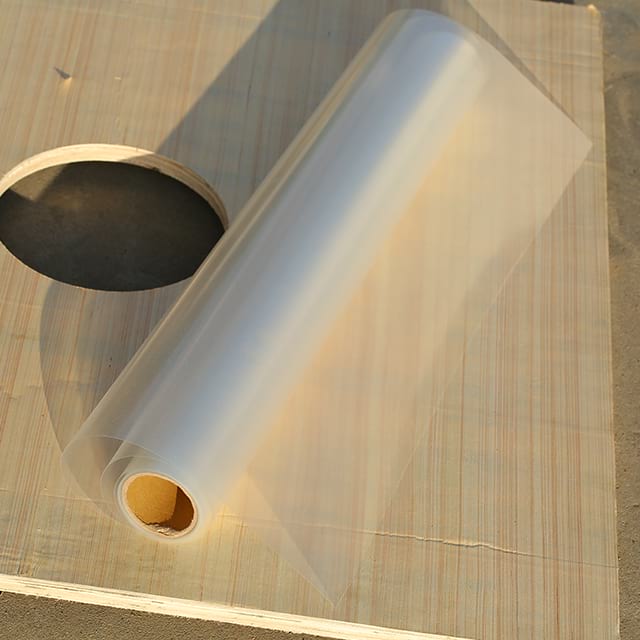
You can bypass this issue by choosing a different finish. A Matte Transparent inkjet film looks slightly milky or translucent. It does not offer glass-like clarity. Instead, it features a micro-textured surface.
This translucent finish proves best for screen printing positives. It also excels in pre-press proofing. The advantage lies in the physical texture. The matte finish provides essential grip for printer feed rollers. Smooth clear films often slip during printing. Slipping causes disastrous registration errors. The textured surface prevents slipping entirely. Furthermore, the specialized matte layer holds the heavier ink loads required for optimal UV-blocking.
Buying the right substrate requires careful evaluation. You cannot simply order the cheapest option available. You must align the material specifications with your existing hardware and workflow demands.
Film thickness dictates how well the material travels through your machine. Industry professionals measure thickness in mils or microns. Standard commercial grades sit around 4mil to 5.3mil. This translates to approximately 100 to 135 microns.
Thinner films present distinct risks. They lack rigidity. They often buckle or wrinkle inside the machine. This leads to severe paper jams. Thicker films present a different challenge. They remain extremely stiff. Very thick films may not pass through standard desktop inkjet feeders. They struggle to navigate tight curved paper paths. Always check your machine specifications. Ensure your feed mechanism supports 5mil media before ordering bulk supplies.
You must verify whether the coating is universal or specific. Printers use two main types of liquid. They use dye-based or pigment-based formulas. Each reacts differently.
Dye inks absorb deeply into the microporous layer. They offer incredibly deep, rich blacks. This makes them ideal for screen positives. However, dye formulas lack UV resistance. They fade quickly when exposed to sunlight. Pigment inks consist of microscopic solid particles. They offer excellent archival longevity. They resist fading perfectly for backlit window displays. However, pigment particles sit closer to the surface. They require specific coatings to adhere properly. Using pigment on the wrong coating causes the graphic to flake off easily.
Static electricity causes massive headaches in print environments. Film unrolling from a spool generates static charges. Static buildup in dry environments attracts airborne dust instantly.
Dust ruins your work. It settles on the unprinted sheet. The ink sprays over the dust. Later, the dust falls off, leaving white pinholes in your solid black areas. Pinholes ruin screen exposures by letting unwanted light pass through. Dust also transfers to the expensive print heads, causing clogs. Evaluate supplier specifications carefully. Look for integrated anti-static treatments applied during the manufacturing process.
Even the best materials fail if handled incorrectly. You must establish strict quality control protocols. Understanding common risks helps you avoid wasted time and money.
Risk 1: Smearing and Slow Drying Times
Operators sometimes complain about wet prints. The liquid smears when touched. The cause usually stems from two mistakes. The operator might be printing on the wrong side. They might also be exceeding the machine ink limit.
You can mitigate this easily. Always verify you are using the correct side. The coated side feels slightly sticky or textured to the touch. The uncoated side feels perfectly smooth. The liquid will never dry on the smooth side. Additionally, advise your prepress team to calibrate the printer profile. You should lower the overall ink volume. Find the exact balance where you achieve maximum opacity without flooding the microporous layer.
Risk 2: Laser Printer Melting Hazards
Workspaces often house multiple types of machines. Operators sometimes confuse supplies. They might put inkjet PET into a laser machine.
The mitigation requires strict discipline. You must emphasize the danger to all staff. Inkjet film coatings cannot survive high temperatures. They will melt instantly under laser fuser heat. The melted plastic wraps around the hot fuser rollers. This permanently destroys the printer. You will face a massive repair bill. Establish strict physical separation in multi-printer workspaces. Store supplies in clearly labeled, separate cabinets.
Best Practices for Quality Control
Check ambient humidity. Keep the room between 40% and 60% relative humidity.
Handle sheets by the edges. Oil from your fingers prevents ink adhesion.
Store unused media in its original sealed plastic bag.
Let heavy ink loads out-gas properly before stacking sheets.
Inkjet PET film bridges the vital gap between digital design and physical manufacturing. It serves as an irreplaceable tool in commercial environments. It provides the dimensional stability required for screen printing positives. It offers the brilliant light diffusion needed for commercial backlit displays. Understanding material mechanics ensures you achieve predictable, high-resolution results.
You should take proactive steps to integrate this substrate successfully.
Match your chosen film finish to your specific application needs.
Verify your exact hardware thickness limitations before placing large orders.
Calibrate your software profiles to control ink density and prevent pooling.
Start with a small sample pack to test roller grip and alignment.
Check actual drying speeds under your specific workshop climate conditions.
Testing a small batch protects your budget. It allows you to confirm compatibility before committing to high-volume roll or sheet purchases.
A: No. The inkjet-specific coating cannot withstand the fuser heat of a laser printer. It will melt instantly upon entering the fuser unit. This causes severe, permanent hardware damage to the machine rollers. Always keep these supplies strictly separated.
A: The PET plastic base itself is completely waterproof. However, the microporous inkjet coating and the ink are usually only water-resistant. Heavy moisture can re-activate water-based inks. This causes smudging and running unless you actively seal or laminate the final printed piece.
A: With a high-quality microporous coating, it feels dry to the touch almost instantly. However, we highly recommend letting it out-gas and cure. Wait 10 to 15 minutes before stacking multiple sheets. You should also let it cure fully before using it for screen exposure.


